Give the Space Quiz a public home by deploying it with GitHub Pages. Copilot can prepare the workflow and guide the deployment, but you remain responsible for reviewing the changes and confirming that the site is live.
In this lesson, you will:
- ask Copilot to configure a GitHub Pages deployment.
- review the workflow and pull request before merging.
- follow the deployment and verify the published site.
Scenario
The Space Quiz is already in a GitHub repository, but people still need a simple way to try it. Publishing the single-file site with GitHub Pages makes it available from a public URL without adding a server or runtime dependency.
Ask Copilot to prepare the deployment
In the Copilot app session for space-quiz, send this prompt:
Prepare a GitHub Pages deployment for this repository. Create a GitHub Actions workflow that builds the website if needed and deploys it to GitHub Pages after changes reach the default branch. Add a README describing the app and how to run it locally if one does not already exist. Create a pull request with these changes and report its link and any required Pages settings or permissions. Do not merge, enable auto-merge, change Pages settings, or deploy. Stop and wait for my review.Review the workflow and pull request
- Confirm that the README is added only if the repository does not already have one.
- Review the pull request changes, including the workflow’s build and deployment steps, triggers, and permissions.
- Confirm that the workflow deploys from the default branch, not from an unmerged pull request.
- Request any corrections and review the updated diff. Wait for the required pull request checks to pass before authorizing a merge.
Authorize the merge and deployment
Replace <PR_NUMBER> with the number of the pull request you reviewed, then send this separate prompt:
I have reviewed pull request <PR_NUMBER> in this repository and authorize its merge and deployment. Enable GitHub Pages using GitHub Actions, merge that pull request only after required checks pass, and monitor the deployment until it succeeds. Report the final URL of the live website. If you lack permission to enable Pages or merge, tell me exactly what I need to approve or do; do not report success until the site is live.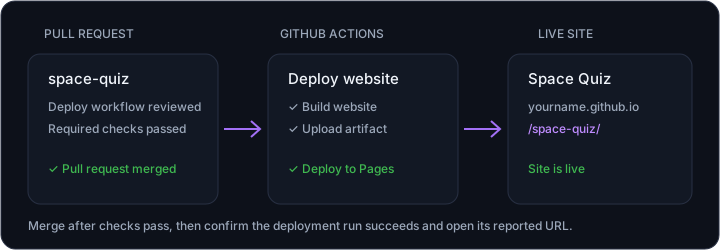
Verify the deployment
- Follow the GitHub Actions deployment run until it succeeds.
- Open the reported URL and confirm that the Space Quiz loads.
If the agent cannot enable Pages or merge the pull request, follow the specific instructions it provides. Do not treat the task as complete until the deployment succeeds and the live site loads.
Summary and next steps
Your Space Quiz is now available as a live site, and you have verified the deployment instead of relying on the agent’s report. Continue to Lesson 13: Review and next steps.